Changelog

Follow new updates and improvements to 3rdRisk.

Platform Improvements - October 5, 2026
While this update may seem a bit smaller on the surface, there are still some heavy-hitters in the mix. From new integrations and an addition to the content hub, to a very interesting preview at some upcoming “agentic” changes.

Grab a cup or glass of your favorite beverage, and let’s dive into the latest and greatest in the 3rdRisk platform.

Key changes

N-tier mapping

Map who supplies your suppliers: Your third-party catalog can now surface N+1 (sub-supplier) relationships automatically. For AI-enabled tenants, an AI agent identifies likely sub-suppliers behind your direct third parties and adds them to the catalog as "Identified" rows.

The catalog itself now shows this structure visually too, with sub-suppliers nesting under their parent third party and expanding in place, so you can see your extended supply chain at a glance instead of hunting for it.

AI Document Analyzer

Analyze multiple documents at once: You can now upload and analyze several PDFs in a single batch instead of one at a time, cutting down on repetitive manual work when you're reviewing a stack of contracts, policies or certificates.

DocuSign integration

Sign without leaving the platform: Send a document for signature directly from the action menu on a contract, pick your signers, and the platform handles the rest.

Status updates flow back automatically as each signer completes their part, and the fully signed PDF lands back on the contract record when everyone's done.

Customization & configuration

Give risk domains their own identity: Risk domains can now carry their own name, level names and colors, independent of the Overall Risk Profile, so the labels and colors you see reflect how your organization actually talks about risk.

Make the assistant your own: Tailoring the platform to fit your organization’s branding and culture has become even easier. Admins can set a custom name and picture for the AI assistant themselves, no support ticket required.
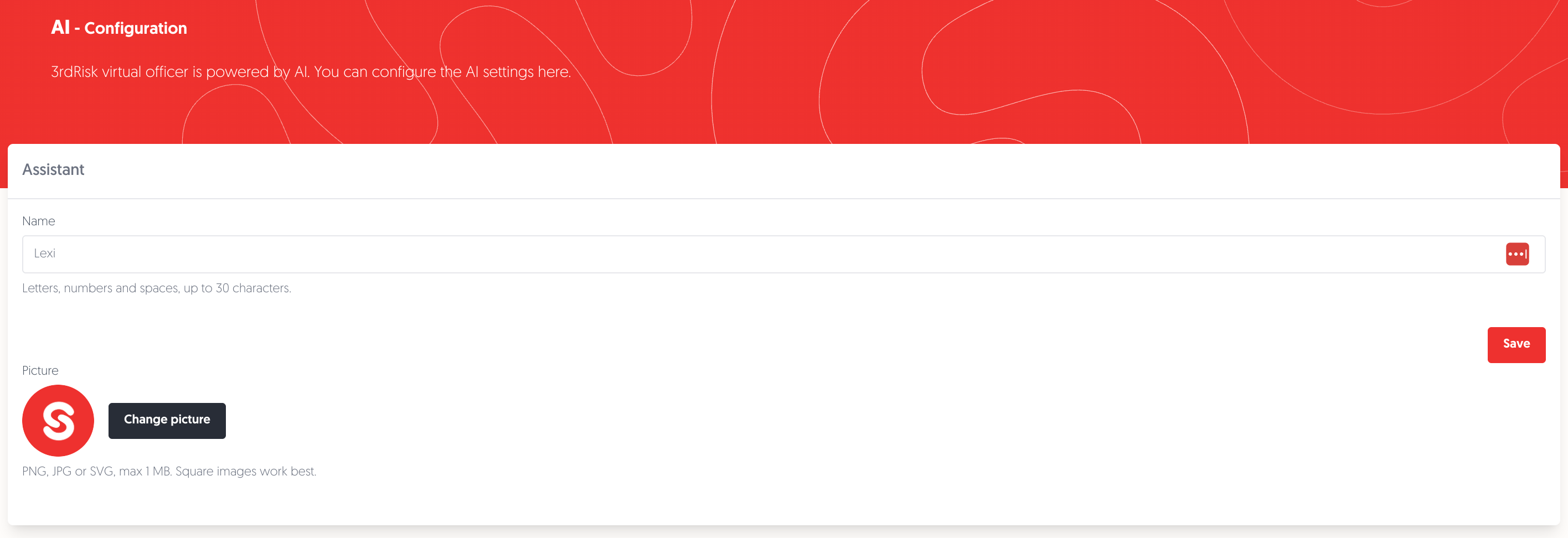
Changing the name & image of your AI is as simple as clicking a few buttons!

Archiving

Archive and restore third parties, contracts and action plans: Third parties you no longer work with can now be archived straight from the overview action menu, and found again later with an "Is archived" filter.

Archiving a third party triggers a pop-up, showing you the contracts and action plans that will be archived with it in one all-or-nothing action, with a confirmation summary before anything changes.

Changed your mind, or archived something by mistake? No worries, you can easily restore a third party, contract or action plan from the same menu, and anywhere else a record references an archived third party, you'll now see its real name with an "archived" marker instead of a blank field.

Quality of life changes

  • API coverage grows: Contracts (create/update) and Questionnaires (read) have joined the v2 API, alongside generic configuration-list endpoints and updated documentation.

  • SecurityScorecard in Predictive Risk: SecurityScorecard cybersecurity scores now feed into the Predictive Risk Profile and appear as tracked events on the dashboard widget.

  • Automatic Slack sync: Linking Slack accounts to users is now automatic, saving admins the manual setup work & ensuring everyone gets their notifications.

  • Self-service BusinessRadar: BusinessRadar activation and syncing now runs on its own schedule, with no developer involvement needed.

  • World map home view: The ecosystem world map now opens centered on your own organization's region, instead of defaulting to a fixed world view.

  • Bulk answer reset: Reviewers can reset the adjusted answer on several assessment questions at once from the bulk actions menu.

  • Consistent risk exports: Risk profile and third-party exports now both include Overall risk and Inherent risk side by side, using the same wording you see on screen.

Content Hub

Sapin II framework

A new Sapin II framework, with a matching anti-corruption questionnaire, is now available. Sapin II is France's anti-corruption law requiring large companies to vet third parties and prevent bribery, and the new framework lets you assess third parties against it directly in 3rdRisk.

Looking ahead

We're building our first autonomous agent: the Assessment Review Agent. As soon as an assessment is submitted, it will review every question against contract obligations, compliance frameworks, risk profiles, sanctions results and prior assessment history, and prepare a suggested outcome before a human reviewer ever opens it. This is the biggest step in our AI roadmap yet, and it's already taking shape.

Alongside it, we're rolling out an MCP server, so AI clients can query and act on your platform data directly. The foundation and the Third Party module are built and awaiting release, while Contracts, Risks, Issues, Action Plans, Risk Domains, Assessments, Questionnaires and Users modules are all actively in progress.

And our API keeps expanding, with more endpoints and read/write coverage on the way.

Questions or cool ideas? You can submit a feature request, or a send us a bug ticket. Check our roadmap to see what else is coming.

Stay tuned, there’s plenty more on the horizon. 

— 3rdRisk Product Team
NewImproved

Platform Improvements - September 2026

Another update brings another batch of improvements and new features to the 3rdRisk platform. So, without further ado, let’s dive into the latest changes. 

Key changes 

Assessments 

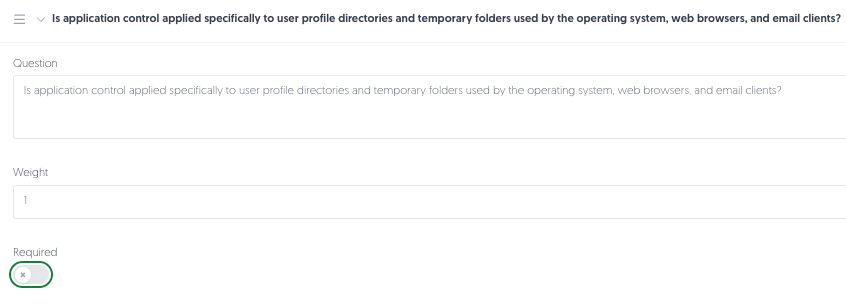
Optional questions: Last month we brought conditional questions. This time we’re bringing you its brother: optional questions. 

Making a question optional is as easy as leaving the "required" slider greyed out.

You can now choose if a question is required or not, allowing your supplier to submit a response without answering every single one, instead of getting stuck on a question that isn’t actually essential. 

Contract management 

Keep a colleague in the loop: Add a CC email address at contract level for incoming assessments, so a colleague gets a copy without you needing to forward it manually. 

Notifications reach the right person: Contract, third-party and assessment notifications now go to the assigned contract manager or business owner, rather than whoever happened to create the record, so the right person hears about it even if they joined the file later. 

EBA compliance 

If you report against the EBA Guidelines on outsourcing arrangements, then this is by far the most important section for you. 

Deeper contractual and sub-outsourcing detail: Maintain a record of the contractual safeguards regulators expect, such as agreed service levels, mandatory insurance, data access on insolvency, a regulator cooperation clause and a BRRD reference, plus full detail on sub-outsourcing, including where each named subcontractor is registered and where your data actually sits. 

Improved autofill: Upload an agreement and Lexi’s contract analyzer now auto-fills every field the register needs, not just the original set, and records why an arrangement is classified critical or important, who signed off on that, and its audit dates. 

Outsourcing register, ready for export: Generate an EBA outsourcing register export straight from the platform, a cover sheet plus three data sheets in Excel, with a built-in check that flags any required field still missing before you send it anywhere. 

On top of this we also added cloud service model and deployment model fields for cloud outsourcing arrangements, and made some changes to ensure eight existing contract fields are marked and exported, so they now come through correctly as EBA register data. 

Ecosystem country risk map 

See where your risk actually sits: The Ecosystem page has a new Country Risk tab: a world map with every country colored by its risk level.

Hover for the level, click through for that country’s AI risk profile and recent news, or create or link a risk or issue without leaving the map. The existing supply-chain tree diagram keeps its place, now on a tab of its own alongside it. 

Individual & entity screening 

One view for company and individual hits: Your risk profile gets a dedicated tab for sanctions and PEP screening, plus a matching tab for individuals connected to a third party, such as directors or beneficial owners. Add someone yourself, or let Lexi flag them automatically.  

Anything Lexi finds stays marked as unconfirmed until you check it, so nothing slips through without a second pair of eyes, and your catalog’s compliance indicator updates the moment a hit comes in. 

Overall Risk Profile 

A risk score you can trust: The Overall Risk Profile is now one fully configurable, calculated score, combining inherent risk, assessment results, sanctions and country risk, with the weighting behind it set by your organization.

It replaces the old manual “Risk Profile” field, so the badge on a third party’s record reflects the same formula every time, rather than whoever last had a hunch about it. 

Set the weights yourself: Decide how much inherent risk, assessments, sanctions and country risk each count for, tenant-wide, from your own configuration screen, rather than living with a fixed formula.

Change the balance as your risk appetite shifts, and every score across the catalogue recalculates to match. This way the scores you see always line up with your organization’s priorities.

Self-service & administration 

Restoring users: Admins can now restore an archived user directly, instead of filing a request and waiting for us to do it. 

Set up registration forms yourself: Configure the fields, owners, coordinators and messages on your registration forms without raising a support ticket. 

Third-party catalogue 

A ready-made risk report: Generate a Third-Party Risk Report straight from the catalogue. Preview it on screen, then download it as a PDF whenever you need one for a file, a meeting with the board, or an auditor. 

Heads-up before you create a duplicate: Adding a third party that shares a VAT, DUNS, KvK or reference number with an existing record now gets blocked outright, and a shared name and country gets a softer warning. Either way, you get to spot the duplicate before it’s officially in the system, instead of realizing months later. 

One action plan, many third parties: Link a single action plan to several third parties at once, instead of duplicating it for each one and losing track of which copy is current. 

UK material third party register (PRA/FCA)

If you're preparing for the PRA, FCA and Bank of England's joint third-party reporting requirements (PS7/26), effective 18 March 2027, you can start building your register now rather than scrambling closer to the deadline.

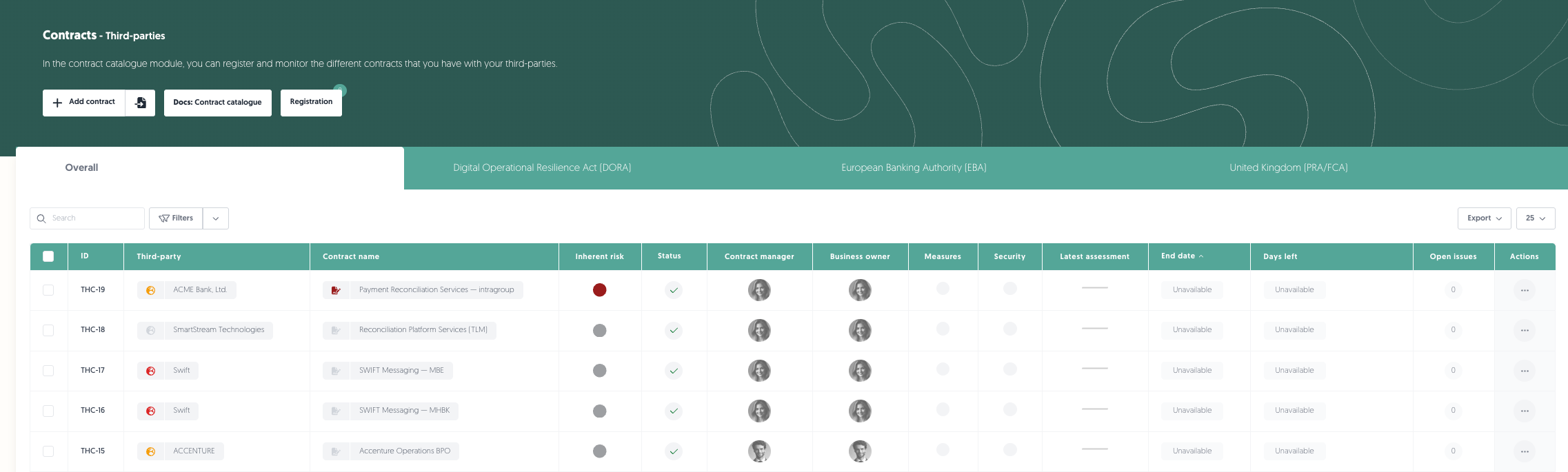
A UK register, ready for compliance: Put any contractual arrangement into UK scope alongside DORA or the EBA guidelines. Every field the Form M notification and Material Third Party (MTP) Register ask for, now has a place on the contract, matched field-for-field to the FCA's own templates.

Checking which contracts fall under DORA, EBA or RFA/FCA only requires one click.

Only asked what applies to your firm: Materiality reasons, impact tolerances and supervisory objectives are driven by the supervisory authority or authorities on your organisation profile, so an arrangement only surfaces the questions relevant to you, whether that's the PRA, the FCA, or both.

Know what's missing before you submit: A dedicated UK register health check shows your overall completeness, flags exactly which arrangements and fields still need attention, and takes you straight into the contract to fix it.

Export in the format regulators expect: Generate the MTP Register export or a Form M notification for a single arrangement, in the FCA's own template structure and wording, ready for submission via RegData or FCA Connect.

Quality of life changes 

  • API documentation: Published, up-to-date documentation for the third-party and action plan APIs, for anyone on your team integrating with 3rdRisk directly. 

  • Contract setup from the catalogue: Create a default contract, individually or in bulk, directly from the third-party catalogue instead of hitting an empty dropdown. 

  • Faster contract screen: Dropdowns in the contract screen now search live instead of loading every option upfront, so it opens and responds noticeably quicker. 

  • Filter memory in the control library: The control library now remembers your filters, search and page position after you save an item, instead of resetting. 

  • News monitoring where you’d expect it: News monitoring moved from a standalone pop-up into a tab on the third-party record itself, with a badge flagging anything that needs your attention. 

  • Unlink an issue without starting over: Remove a linked issue from a control assessment, with confirmation and a full audit trail, instead of being stuck with it once it’s linked by mistake. 

Looking ahead 

Restoring an archived user landed this time, and the same workflow is coming to third parties, contracts and action plans too. We’re also in the final stretch of testing our DocuSign integration, so accepting a signed contract won’t mean leaving the platform to chase it. The final step of our Slack is ready, so expect that in the coming week.

Further out, we’re teaching the platform to spot who supplies your suppliers, so the tier just out of sight today stops being a blind spot. And lastly, published API documentation is just another piece of the developer portal puzzle, with much more to come every week!

Questions or cool ideas? You can submit a feature request, or a send us a bug ticket. Check our roadmap to see what else is coming.

Stay tuned, there’s plenty more on the horizon. 

- 3rdRisk Product Team 

NewImproved

Platform Improvements - August 2026

We are hosting our annual Summer Meet-Up on the 10th of September in Amsterdam, RSVP today!

Another month another update!

Back in July we teased that assessments were getting conditional logic and autofill. Both are here, along with plenty of other exciting changes. Our team has been hard at work, so, without further ado, let’s dive into the latest batch of changes.

Key changes

Assessments

Questionnaire builder: If you have ever opened a four-sheet Excel template and hoped the row references still lined up, this one is for you. Questionnaires are now built in the platform. Set your domains, questions, weights and scoring, preview the whole thing exactly as a supplier will see it, then publish.

Existing and in-use questionnaires can easily be duplicated it and edited. Everything currently running carries on undisturbed.

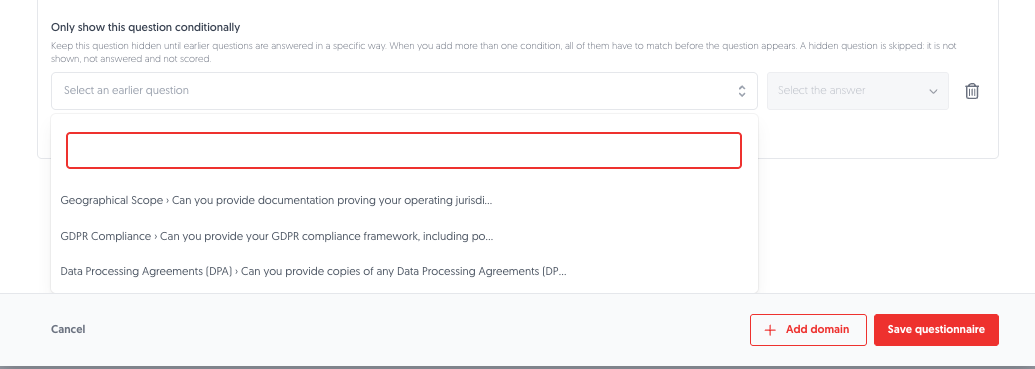
Conditional questions: Not every question applies to every supplier. Asking anyway wastes their time and gives you answers that aren’t actually useful. But not including the question altogether means you might miss out on answers from relevant suppliers.

Questions can now stay hidden until an earlier answer makes them relevant. For example, asking whether a supplier processes personal data brings up the follow-ups only when the answer is yes. Hidden questions are not scored and never reach your exports, so nobody is marked down for a question that was never theirs.

Ensure questions only show up to relevant suppliers with conditional quesstions.

Answers carried over: Your suppliers may be the only group of people that dislike reassessment season more than you. Responding to the same questions with the same answers gets tiresome after a while.

Which is why from now on when a questionnaire they have completed before comes round again on the same contract, the supplier portal now offers to fill it in from their last finished assessment.

They get a prompt on each questionnaire, answers carry across while comments and attachments do not, and every field that was filled in is marked with a blue border so they know exactly what to check before submitting.

A copy for the supplier: Until now, a third party filled in an assessment and kept nothing. From now on when they are done, they get to take their answers with them, either downloading a PDF straight away or having one emailed to the address the invite went to. Emailed copies are password protected, with the password sent separately.

The PDF follows your branding and lists every questionnaire, domain, question, answer and comment, so they have something to work from next time round. Consider it a useful souvenir for your vendors.

A few smaller things: Questionnaire details are now visible from inside an assessment, you can set the next assessment date while you are finalising the current one, and exports have been extended to cover questionnaires you have since archived.

Business impact analysis

A risk profile for your own organisation: Within our platform, it is easy to see which of your suppliers are critical. Knowing the same about your own processes is a harder question, and far too often the answer ends up living in a spreadsheet that stopped being accurate a week after it was built.

Every organisation element with an active CIA domain now sits in one table: confidentiality, integrity and availability scored side by side, who assessed and reviewed it, what is linked to it, and when the next review is due. Overdue ones tell you how late they are.

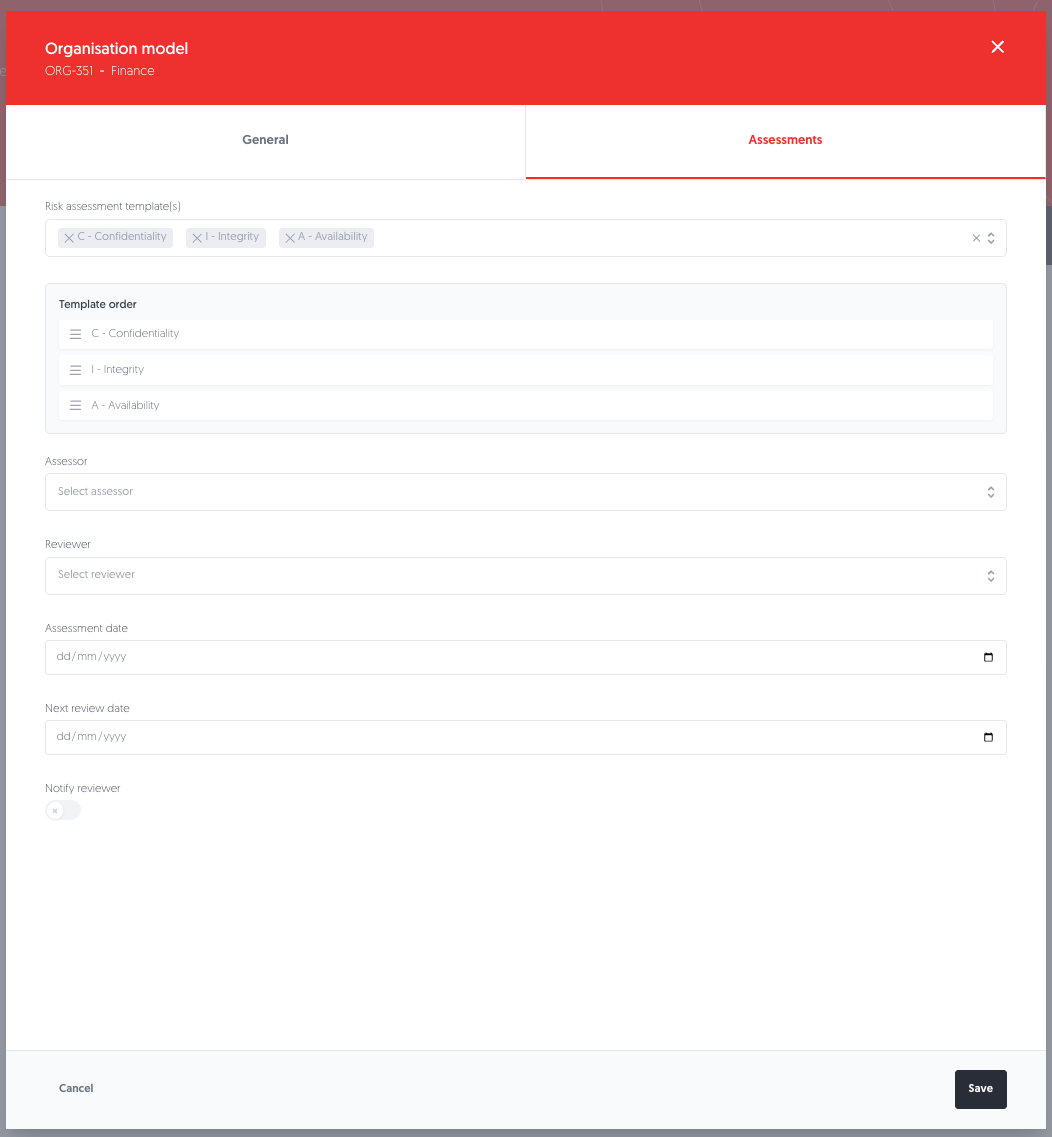
Assessments on any element: Each element in your organisation model has its own assessments now, with an assessor, a reviewer, dates, and a notification when it is the reviewer's turn. More than one template can run against the same element, so a facility can carry a business impact analysis alongside whatever else it needs.

A template to start from: Building a BIA from a blank page can be a pain, and hardly anybody's idea of a good week. That’s why we provide you with a ready-made one covering confidentiality, integrity and availability across 13 scored questions, available to everyone from the start.

Assess each element of your organisation model

Wider coverage: Multi-domain assessments now run against far more of your organisation: assets, processes, key services, facilities, departments, value chains, factories and warehouses.

Third-party catalogue

Link a risk where you are: Adding a risk used to send you off to the risk register, and linking an existing one was not possible at all. Both can now happen from the third party itself.

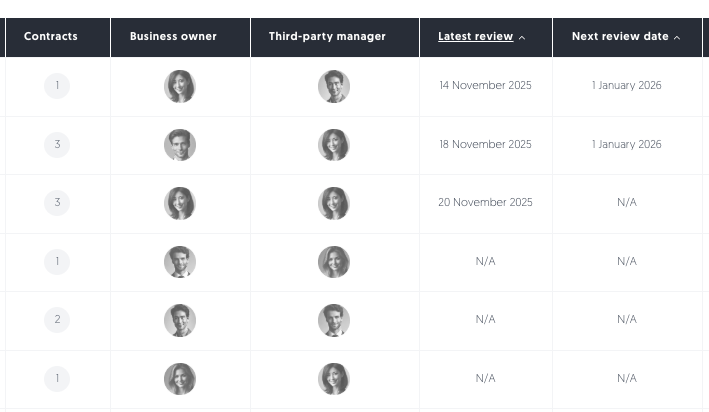
See what is due next: The next review date is a column you can sort on, so finding everything due this month takes a click rather than opening records one at a time.

Easily sort your third parties in the catalogue based on the latest or next review date.

Find what is missing: Filter the catalogue by whether a document type is there or not. Finding the twelve suppliers without a current certificate stops being an afternoon's work.

And two more: Documents can now carry tags, the same way third parties do, and every column in the catalogue can be clicked for sorting.

Contracts

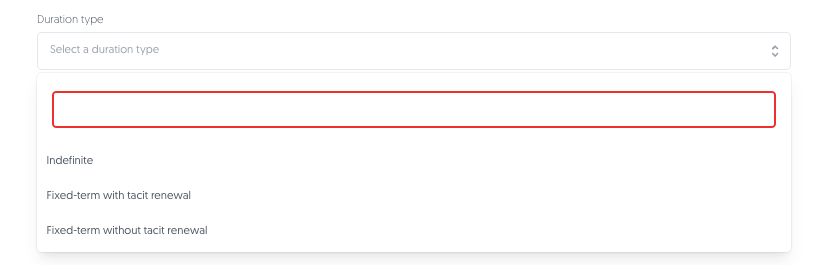
Duration types: Tacit renewal is easy to miss, right up to the point where it is too late to do anything about it. Contracts can now be indefinite, fixed-term with tacit renewal, or fixed-term without.

A tacitly renewed contract extends its own end date and nudges you 90 days before the notice deadline, while there is still something you can do about it.

Changes in duration types are easily managed within the platform.

Prompts that follow your notice period: The renew-or-exit prompt works back from the notice deadline rather than the contract end date. If you owe three months' notice, you hear about it with three months to go.

EBA fields in imports: Contract imports now include the EBA compliance fields, matching what DORA already supported, so your register can go out and come back without being rebuilt by hand.

News monitoring

Issues that arrive pre-written: Raise an issue from a news item and the type, deadline, location and criticality are already filled in. A note tells you what was pre-filled, so you can change anything that does not fit.

Link news to work already underway: A news item can be attached to an issue you have open rather than starting a new one, which keeps a developing story in one place.

Easier to spot: The news monitoring column has moved to the front of the third-party table, where you will actually see it.

You can now easily spot any updates to the news sentiment.

Admin self-service

Control assessment emails can now be edited in “Communication” alongside your other templates, custom fields can be deleted or archived without asking us, and scheduled assessments can be deleted when plans change.

Quality of life changes

  • Audit trail: Exports are now recorded in the audit log, showing who ran the export, what they exported, how many records it covered and when. Useful when someone needs to account for data leaving the platform.

  • Document analyser: The AI document analyser now works in the Internal Control module as well, so you can pull details out of an uploaded document without leaving the control you are working on.

Looking ahead

Next up: a public API and developer portal so you can build on the platform directly, work on mapping the third parties behind your third parties, archiving and restoring so finished records can be put away without disappearing, a DocuSign integration, and a single view of screening results for individuals and entities. Plenty more brewing.

Stay tuned, and we will see you soon.

- 3rdRisk Product Team

NewImproved

Earlier updates